
If You Think Running Your Business in Excel Is Normal, I Have Some News for You

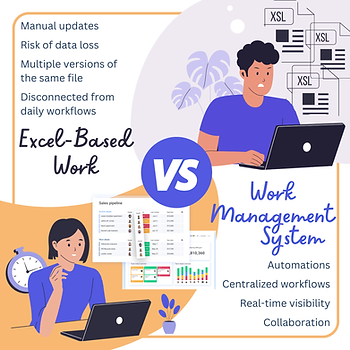
If you’re running your business in Excel and it feels normal, you’re not alone.
Most small and mid-size businesses start with spreadsheets. They’re familiar, accessible, and flexible. In the early days, Excel feels like the easiest way to track clients, projects, finances, or tasks.
The problem isn’t Excel.
The problem is what happens when your business grows — and your spreadsheets don’t.
Why Excel Works (At First)
Excel is popular for a reason. It’s:
Easy to set up
Flexible for simple tracking
Low cost
Familiar to almost everyone
For solo founders or very small teams, spreadsheets can be perfectly adequate. At this stage, speed matters more than structure.
Where Excel Starts to Break Down
As soon as your business gains complexity, cracks start to appear.
Common signs include:
Multiple versions of the same file
No single source of truth
Manual updates and reporting
Limited visibility for leadership
No automation for repetitive work
Knowledge living in people’s heads
At this point, Excel doesn’t fail loudly — it fails quietly. Missed follow-ups. Delayed decisions. Extra admin work.
This Isn’t About “Excel vs Software”
This is an important distinction.
Excel isn’t “wrong.”It’s just not built to support:
Growing teams
Cross-functional workflows
Ongoing processes
Real-time collaboration
Scalable reporting
Spreadsheets are static by nature. Growing businesses are not.
What Modern Work Platforms Do Differently
This is where tools like monday.com come into play.
Instead of tracking work in files, these platforms are designed to manage work as a system:
Shared workflows across teams
Automations instead of manual steps
Dashboards for real-time visibility
Clear ownership and accountability
One source of truth
For many businesses, the shift isn’t about features — it’s about control and clarity.
A Real-World Pattern We See Often
Many teams come to us managing:
Sales in one spreadsheet
Projects in another
Follow-ups in emails
Reporting done manually at month-end
Everything technically “works,” but nothing feels stable.
Once workflows are centralized into a system, teams usually say the same thing:
“I didn’t realize how much time we were losing.”
How to Know If You’ve Outgrown Excel
Ask yourself:
Are we copying or re-entering the same data across multiple files?
Do reports take more than a few clicks—or require manual prep every time?
Do different people work from different versions of the same spreadsheet?
Are tasks and follow-ups dependent on someone remembering to send a reminder?
Would we lose critical data if someone deleted or overwrote the “master” file?
Can we see the full history of a task in one place—emails, notes, ownership changes, and decisions?
Do we have visibility into client activity without searching through spreadsheets, inboxes, and chat threads?
Do we ask teammates what was discussed with a client instead of seeing it in one client view?
If several of these feel familiar, Excel may be holding you back — quietly.
When Growth Changes the Rules
Running your business in Excel is normal — until growth changes the rules.
Outgrowing spreadsheets isn’t a failure. It’s usually a sign that your business is ready for structure.
The right system doesn’t replace your thinking — it supports it.


Comments